- install mariaDB
- http://mungeol-heo.blogspot.kr/2015/07/mariadb.html
- mysql-connector-java
- yum -y install mysql-connector-java
- use latest version if "option sql_select_limit=default" error occurs
- cd /usr/share
- mkdir java
- cd java
- wget http://cdn.mysql.com/Downloads/Connector-J/mysql-connector-java-5.1.36.zip
- unzip mysql-connector-java-5.1.36.zip
- cp mysql-connector-java-5.1.36/mysql-connector-java-5.1.36-bin.jar .
- ln -s mysql-connector-java-5.1.36-bin.jar mysql-connector-java.jar
- use latest version if "option sql_select_limit=default" error occurs
- ls /usr/share/java/mysql-connector-java.jar
- chmod 644 /usr/share/java/mysql-connector-java.jar (option)
- yum -y install mysql-connector-java
- wget -nv http://public-repo-1.hortonworks.com/ambari/centos6/2.x/updates/2.1.0/ambari.repo -O /etc/yum.repos.d/ambari.repo
- yum -y install ambari-server
- service postgresql stop
- RDB setting
- mysql -u root -p
- CREATE USER 'ambari'@'%' IDENTIFIED BY 'bigdata';
- GRANT ALL PRIVILEGES ON *.* TO 'ambari'@'%';
- CREATE USER 'ambari'@'localhost' IDENTIFIED BY 'bigdata';
- GRANT ALL PRIVILEGES ON *.* TO 'ambari'@'localhost';
- CREATE USER 'ambari'@'bigdata-dev01.co.kr' IDENTIFIED BY 'bigdata';
- GRANT ALL PRIVILEGES ON *.* TO 'ambari'@'bigdata-dev01.co.kr';
- FLUSH PRIVILEGES;
- mysql -u ambari -p
- CREATE DATABASE ambari;
- USE ambari;
- SOURCE /var/lib/ambari-server/resources/Ambari-DDL-MySQL-CREATE.sql;
- ambari-server setup
- Select y at Enter advanced database configuration
- enter 3 (mysql)
- select default values for all left
- ambari-server start
Monday, November 30, 2015
Install ambari 2.1.0 using non-default databases (HDP)

HDP 2.2 installation
- yum -y install java-1.7.0-openjdk (option)
- ulimit -Sn / ulimit -Hnconfigure FQDN at /etc/hosts, /etc/sysconfig/networks and using hostname command
- 65535
- ssh-keygen (passwordless connection)
- NTP yum -y install sudo (option)
- yum -y install ntp
- chkconfig ntpd on
- service ntpd start
- THP
- check
- cat /sys/kernel/mm/redhat_transparent_hugepage/defrag
- cat /sys/kernel/mm/redhat_transparent_hugepage/enabled
- command and /etc/rc.local
- echo never > /sys/kernel/mm/redhat_transparent_hugepage/enabled
- echo never > /sys/kernel/mm/redhat_transparent_hugepage/defrag
- check
- permission (option)
- ambari
- /bin/hostname
- /usr/bin/sudo
- namenode
- /usr/bin/which
- /bin/ps
- /bin/df
- ambari metrics
- /usr/bin/gcc
- /usr/bin/ld
- /etc/centos-release
- yarn, MR2
- /tmp (check)
- /etc/fstab (default)
- /proc/mounts (current)
- mount -o remount,exec /tmp
- /usr/bin/curl
- /tmp (check)
- knox
- /bin/netstat
- ambari
- Install ambari 2.0.1 (HDP)
- http://mungeol-heo.blogspot.kr/2015/11/install-ambari-201-hdp.html
- install and run services from ambari web
Install ambari 2.0.1 (HDP)
- wget -nv http://public-repo-1.hortonworks.com/ambari/centos6/2.x/updates/2.0.1/ambari.repo -O /etc/yum.repos.d/ambari.repo
- yum -y install ambari-server
- ambari-server setup
- ambari-server start
Friday, November 27, 2015
Machine learning tools
- confusion matrix
- cross-validation
- https://en.wikipedia.org/wiki/Cross-validation_(statistics)
- python function
- k-fold
- leave-one-out
- standard error of the mean
- one hot encoding
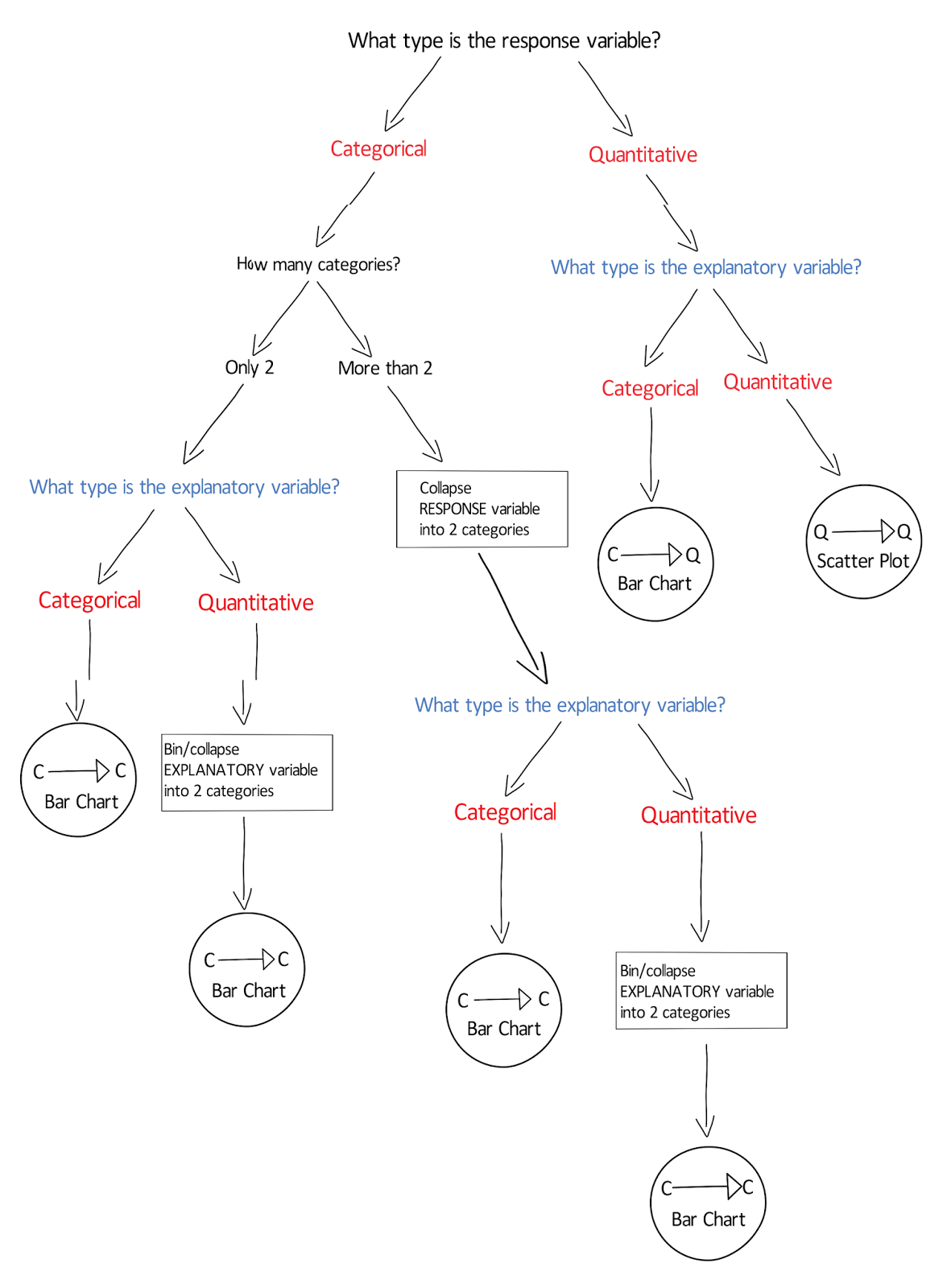
How to choose a statistical test

C -> Q
- ANOVA
- https://en.wikipedia.org/wiki/Analysis_of_variance
- python function
- Tukey's honestly significant difference test
Wednesday, September 30, 2015
R
- 2015.09.03
- read file from remote server (windows)
- install openssh
- download the latest version from http://www.mls-software.com/opensshd.html
- the blank should not be included in the path where you install it
- e.g. D:\OpenSSH
- create keys
- run 'cmd'
- d:
- cd OpenSSH
- cd bin
- ssh-keygen -t rsa
- it will tell you where the keys are created
- e.g. your identification has been saved in /home/admin/.ssh/id_rsa
- the real path is something like, C:\Users\admin\.ssh
- scp /home/admin/.ssh/id_rsa.pub <user name>@<host name>:
- ssh <user name>@<host name>
- if there is no .ssh directory
- mkdir .ssh
- chmod 700 .ssh
- cat id_rsa.pub >> .ssh/authorized_keys
- chmod 644 .ssh/authorized_keys
- exit
- ssh <user name>@<host name>
- it should not ask you to enter the password this time
- warning: unprotected private key file! / permissions 0xxx for 'path/to/id_rsa' are too open (OpenSSH)
- chmod 600 path/to/id_rsa
- try again
- run R/Rstudio
- install.packages("RCurl", dependencies = TRUE)
- require(RCurl)
- x = scp("host name", "/path/to/the/file", key=c("C:/Users/admin/.ssh/id_rsa.pub", "C:/Users/admin/.ssh/id_rsa"), user="user name", binary=F)
- or
- d <- read.table(pipe( 'ssh -l <user name> <host name> "cat /path/to/the/file"' ))
- install openssh
- read file from remote server (windows)
Subscribe to:
Posts (Atom)